Getting Started with Game of Innings: Account Creation and Cloud Save Setup
Dive into Game of Innings with this essential guide for new players. Learn how to create your account and link cloud save to protect your progress from day one.
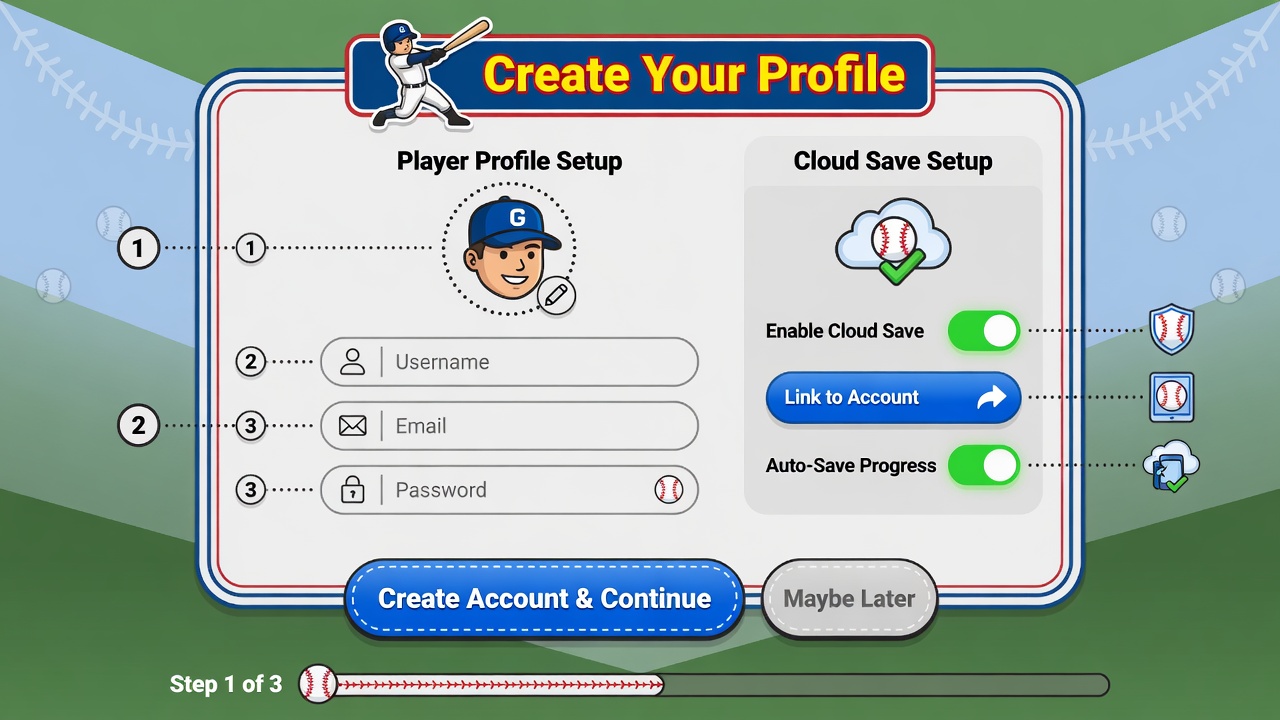
Welcome to Game of Innings, future baseball legend! Your first step to hitting grand slams and pitching no-hitters is setting up your player profile and ensuring your progress is always safe. Upon launching the game for the very first time, you'll be prompted to create an account. This is crucial for accessing all game features, participating in online leagues, and most importantly, enabling cloud saving. Follow the on-screen instructions to choose a unique username and password, and provide a valid email address for account recovery.
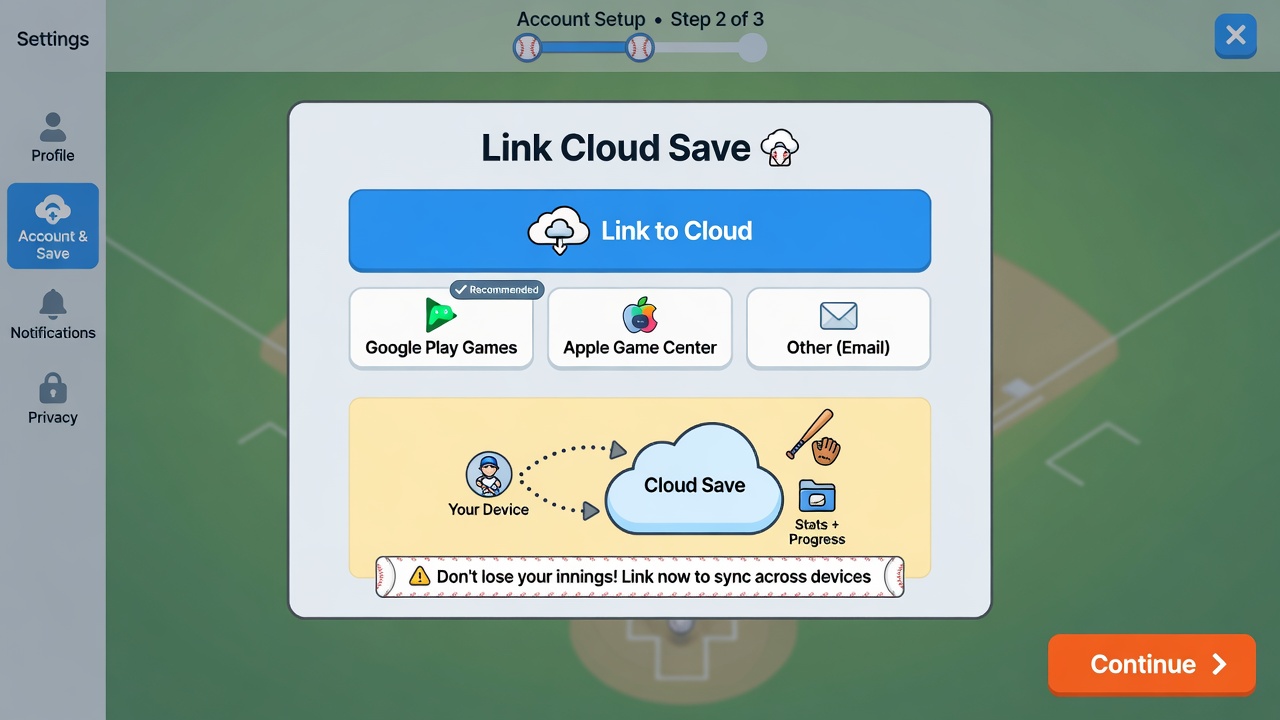
Once your basic account is established, the game will guide you to the cloud save linking process. This step is often presented immediately after account creation or can be found in the 'Settings' menu under 'Account & Save'. We highly recommend linking your account to a cloud service (such as Google Play Games or Apple Game Center, depending on your device) as soon as possible. This ensures that all your hard-earned progress – from player stats to earned currency and unlocked teams – is backed up securely and can be restored if you switch devices or reinstall the game.
To link your cloud save, simply tap the 'Link Cloud Save' button and authorize Game of Innings to connect with your chosen platform. You'll typically be asked to log into your platform account if you aren't already. Confirm the permissions requested, and once complete, you'll see a confirmation message indicating your save data is now synchronized. Make it a habit to periodically check your settings to ensure cloud save is active, especially after major game updates or playing on multiple devices.
After securing your account and cloud save, you're ready to jump into the action. The game will present a brief interactive tutorial covering basic pitching and batting controls. Pay close attention to the on-screen prompts for aiming your pitches with the joystick and timing your swings with the 'Swing' button. Don't worry if your first few attempts aren't perfect; practice makes perfect! Your initial games will help you familiarize yourself with the mechanics.
Your very first full game will likely be an exhibition match designed to ease you into the flow of a complete nine-inning contest. Focus on understanding the rhythm of innings, managing your pitcher's stamina, and making strategic choices at the plate and in the field. Remember, every action contributes to your overall player progression, which is now safely stored in the cloud. Enjoy your first official game and start building your legacy!
Reviews (2)
BasePathBuddy
This guide was super helpful! I was able to set up my cloud save easily on my phone while waiting for my next bus, so now I don't have to worry about losing my progress.
FanZone_Slugger7
This guide was super helpful for getting my account set up right away! Especially loved the tips on cloud save – knowing my progress is safe makes it so much easier to recommend to my friends to join. A must-read for anyone new to Game of Innings!